TestSprite Review 2026: Login, AI, Alternative, Download, Founder & FAQs


Table of Contents
Every few months a tool lands on our desk with a promise so big that we have to roll up our sleeves and find out if it holds up. TestSprite is one of those. The pitch is bold: an AI agent that writes your software tests, runs them, finds the bugs, and then hands your coding assistant the fix. No more babysitting brittle test scripts, no more late nights chasing a failing checkout flow. So the team at NUBIA MAGAZINE spent time digging through its documentation, setting it up inside a real coding environment, reading what hundreds of developers are saying in 2026, and tracing the company back to the people who built it.
Below is our full and honest take, covering what TestSprite actually is, how the login and download work, who founded it, what the day to day experience feels like, the alternatives worth knowing, and the questions people keep typing into Google about the brand this year.
TestSprite at a Glance
Product Name | TestSprite |
Category | AI software testing agent (autonomous end to end QA) |
Founded | 2023 |
Headquarters | Seattle, Washington, United States |
Founders | Yunhao Jiao (CEO), Rui Li (CTO), Xiangyi Shan |
Best For | Developers and small teams shipping AI generated code |
Key Feature | MCP Server that plans, writes, runs, and reports tests |
Works With | Cursor, VS Code, Claude Code, Windsurf, Trae, GitHub Copilot |
Free Plan | Yes, free tier with monthly credits |
Paid Plans (2026) | Starter, Standard, and custom Enterprise pricing |
Website | www.testsprite.com |
NUBIA Rating | 4.0 out of 5 |
Pricing and credit limits change often, so treat the figures here as a snapshot rather than a contract. Always confirm on the official site before you pay.
What Is TestSprite? The AI Behind the Brand
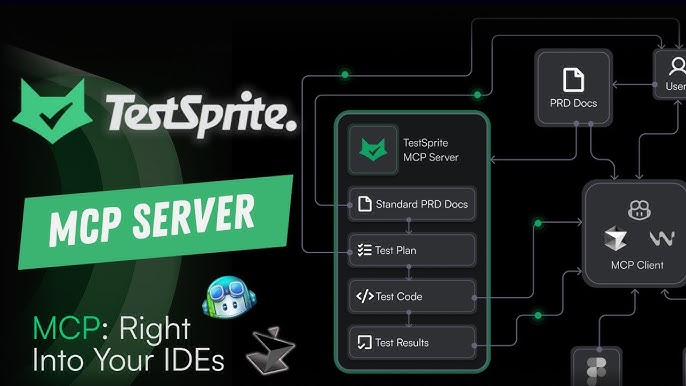
TestSprite is an autonomous AI testing agent. In plain terms, it is software that behaves like a quality assurance engineer who never sleeps. You point it at a project, and it reads your product requirements or simply studies the code itself, builds a test plan, writes the test code, runs everything inside a secure cloud sandbox, and then sends back a clear report on what passed and what broke.
The clever part is where it sits. TestSprite plugs into your coding tools through something called an MCP Server, which is a bridge that lets AI assistants talk to outside services. Once it is connected, you can literally type a sentence like "Help me test this project with TestSprite" and the whole cycle kicks off. It discovers what the app should do, plans the tests, generates them, runs them, and feeds the results straight back to your AI coding assistant so it can patch the problems.
The company likes to point to one benchmark in particular. In its own testing on real web projects, code that started by meeting roughly 42 percent of requirements climbed to about 93 percent after a single round of TestSprite feedback. That is a striking number, and while it comes from the vendor rather than an independent lab, it does capture the core idea well. TestSprite is built less for the old world of hand written test scripts and more for the new reality where AI writes most of the code and someone has to check that it actually works.
TestSprite Login and Getting Started
Getting into TestSprite is refreshingly simple, and this is one area where the team clearly put in the work. There is no clunky installer to wrestle with. You head to the official website, create a free account, and that signs you in to the web dashboard.
From there, the one thing you genuinely need is an API key. You generate it from the API Key page inside your account, and that key is what links the cloud service to your coding environment. Keep it private, treat it like a password, and you are ready to move on to setup. If you ever get locked out, the login and key management both live in the same dashboard, so recovery is straightforward.
How to Download and Install TestSprite
A small point that trips people up: TestSprite is not a traditional desktop app you download and double click. It lives in the cloud and connects to your editor through its MCP Server. So the "download" is really an install of a lightweight package, and it takes about two minutes if you already have Node.js on your machine.
The usual route looks like this:
- Make sure Node.js is installed, then check your version with node --version.
- Install the MCP server globally with npm install -g @testsprite/testsprite-mcp@latest, or run it on demand with npx.
- Add TestSprite to your editor's MCP configuration and paste in your API key.
- Open your project, start the AI chat, and ask it to test the project with TestSprite.
It supports the tools most modern developers already use, including Cursor, VS Code, Claude Code, Windsurf, Trae, and GitHub Copilot. For anyone already comfortable inside one of those editors, the whole thing feels like adding a new teammate rather than learning a new program.
Who Is the Founder of TestSprite?
TestSprite was founded in 2023 and is based in Seattle. The company is led by Yunhao Jiao, its co founder and chief executive, alongside co founders Rui Li, who serves as chief technology officer, and Xiangyi Shan.
Jiao is the public face of the brand, and his background helps explain why the product leans so heavily on automation. He holds a master's degree in computer science from Yale University and spent close to five years as a senior software engineer at Amazon Web Services, where he worked on testing frameworks that checked whether cloud resources behaved as expected. He has also been active in natural language processing research, with his first AI paper published back in 2017. The company has passed through well known startup programs, including Techstars in Miami, and has attracted backing from a mix of venture investors across several funding rounds.
His thinking is consistent in interviews. He argues that writing code is no longer the hard part now that AI tools have made development far faster, and that the real bottleneck has shifted to checking that the code does what it was meant to. TestSprite, in his words, is meant to be the autopilot layer that turns AI written code into software you can actually ship.

User Experience: What It Actually Feels Like
This is where a review earns its keep, so we paid close attention. The strongest impression TestSprite leaves is how little it asks of you. The natural language workflow is the headline. Instead of memorising commands, you describe what you want in a sentence and the agent takes over. For solo developers and small teams with no dedicated QA person, that hands off quality is a real relief.
Setup is quick, the reports are easy to read, and the coverage across both the front end and the back end means you are not stitching together three different tools to test one app. Across review sites in 2026, the recurring praise is the same: it saves time, it catches bugs early, and it smooths out the testing cycle that usually slows a release down.
It is not flawless, and we would be doing you a disservice to pretend otherwise. Here is the balanced picture from our testing and from the wider community.
What we liked
- Genuinely hands off testing driven by plain language prompts.
- Fast, low friction setup inside editors people already use.
- Solid coverage of front end flows, APIs, and edge cases in one place.
- It does not just flag bugs, it suggests fixes your coding agent can apply.
- A free tier that lets you try the core idea before spending anything.
Where it could improve
- The credit based pricing makes monthly costs hard to predict as usage grows.
- Some users want richer, deeper reporting than the current dashboard offers.
- Heavier or larger projects can stretch the experience, and a few teams want better scaling.
- A trial for paid tiers would help teams test at production scale before committing.
Weighed together, that is why we landed on a 4.0. The core promise works, the experience is smooth, and the time savings are real. The friction sits mostly around cost predictability and reporting depth, which are fixable rather than fundamental.
TestSprite Alternatives Worth Considering
TestSprite is good, but it is not the only player, and the AI testing space in 2026 is crowded. Depending on your team size and how technical your testers are, one of these may fit better:
- QA Wolf, for teams that want fully managed end to end test creation and maintenance handled for them.
- testRigor, a strong pick for non technical QA staff who prefer writing tests in plain English.
- Mabl, a low code, AI assisted option known for a fast time to value.
- Functionize, aimed at enterprises that want machine learning trained, self healing tests.
- BrowserStack and Sauce Labs, the established testing clouds built for large scale cross browser and real device coverage.
- DogQ, a no code end to end tool that is easy for cross functional teams to adopt.
- Momentic and Checksum, newer agentic platforms competing directly on autonomous, AI native testing.
If your work centres on validating AI generated code right inside your editor, TestSprite remains one of the cleaner choices. If you need a managed service, a non technical interface, or massive device scale, one of the names above may serve you better.

Frequently Asked Questions About TestSprite
1. What is TestSprite used for?
TestSprite is an AI testing agent used to automatically generate, run, and maintain software tests for both the front end and back end of an application. It is especially popular with developers shipping AI generated code, because it checks that the code actually works and then helps fix what does not.
2. Is TestSprite free to use?
Yes, there is a free plan that comes with a set number of monthly credits, which is enough to explore the platform and run a handful of tests. Heavier or production level use moves you onto a paid plan such as Starter or Standard, with custom pricing available for larger enterprise teams.
3. How do I log in to TestSprite?
You sign up for a free account on the official website, which logs you into the web dashboard. From there you generate an API key, and that key is what connects the service to your coding editor. Both login and key management live in the same dashboard.
4. How do I download or install TestSprite?
TestSprite is not a desktop download. You install its lightweight MCP Server, usually through npm with a single command, then add it to your editor's MCP configuration and paste in your API key. With Node.js already installed, the whole setup takes only a couple of minutes.
5. Who founded TestSprite?
TestSprite was founded in 2023 by Yunhao Jiao, who is the chief executive, together with co founders Rui Li, the chief technology officer, and Xiangyi Shan. Jiao previously spent several years as a senior software engineer at Amazon Web Services and holds a master's degree in computer science from Yale University.
6. Which editors and tools does TestSprite work with?
It connects to the popular AI coding environments through its MCP Server, including Cursor, VS Code, Claude Code, Windsurf, Trae, and GitHub Copilot. That means you can trigger a full testing cycle without leaving the editor you already work in.
7. Does TestSprite only find bugs or does it fix them too?
It does both. TestSprite detects issues across user flows, APIs, and edge cases, classifies what kind of failure it is, and then hands clear, actionable fix suggestions back to your coding assistant so the problem can be repaired quickly.
8. Is TestSprite safe with my code?
Tests run inside secure, temporary cloud sandboxes rather than on your local machine, and the platform is built on established cloud infrastructure. As with any tool that touches your code, you should still protect your API key and review your organisation's own security policies before connecting it.
9. What are the best alternatives to TestSprite?
Strong alternatives in 2026 include QA Wolf, testRigor, Mabl, Functionize, BrowserStack, Sauce Labs, DogQ, Momentic, and Checksum. The right choice depends on whether you want a managed service, a non technical interface, large device scale, or a developer first agent like TestSprite itself.
10. Is TestSprite good for beginners and non developers?
It is friendlier than most testing tools thanks to its natural language prompts, so you do not need to be a testing expert to get value from it. That said, it lives inside coding editors, so complete non developers may find a no code option such as DogQ or testRigor easier to adopt.
The Nubia Magazine Verdict
TestSprite is doing something genuinely useful at the right moment. As more code gets written by AI, the question is no longer how fast you can produce it but whether you can trust it, and TestSprite steps neatly into that gap. The login is painless, the install is quick, the AI does heavy lifting that used to eat whole afternoons, and the founder clearly understands the problem from the inside.
It is not perfect. The credit pricing needs more transparency, the reporting could go deeper, and very large projects will test its limits. But for developers and small teams who want reliable, hands off testing without hiring a QA department, it earns its place. That is why we are comfortable giving TestSprite a solid 4.0 out of 5. It is one to watch, and for many teams in 2026, one to actually use.
Related Posts


0 Comments
Join the discussion and share your thoughts
No Comments Yet
Be the first to share your thoughts on this article!